Tissue culture lab management

From plant request
to the next lab task.

The grow needs plants on a date. The lab needs time to produce them. Put the request, current plant counts and upcoming work in one place, so both teams can check the same plan.

See the current product, discuss your workflow and review the setup needed.

01 / Follow one production need

From the plant request
to the next task.

Follow Acapulco Gold through five steps in the actual product. See how the lab and grow team keep the plan, the handoff and the next job connected.

Fictional lab walkthroughAcapulco Gold · 120-plant target · 132 planned shoots

Cropped actual-app screens from one prepared example. No customer data or claimed results. Choose a step to explore.

Step 1 of 5 / The production need

Start with the plants the grow needs.

Acapulco Gold is assigned to a November 1 production cycle. The prepared plan targets 120 finished plants and calls for 132 shoots, allowing 10% extra.

The team can review the variety, target and stage dates together.
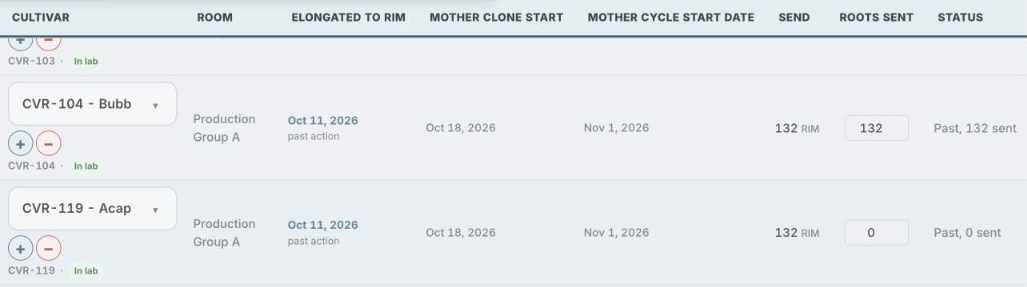
Selected Acapulco Gold order, CVR-119, with October 18 clone start, November 1 cycle start and 132 RIM shoots planned. Zero shoots are recorded as sent in this starting view.
The target and dates are already configured in this example. The buffer is a planning allowance, not a yield guarantee. Open this screen larger in a new tab

Step 2 of 5 / The available batch

Check the batch before it moves.

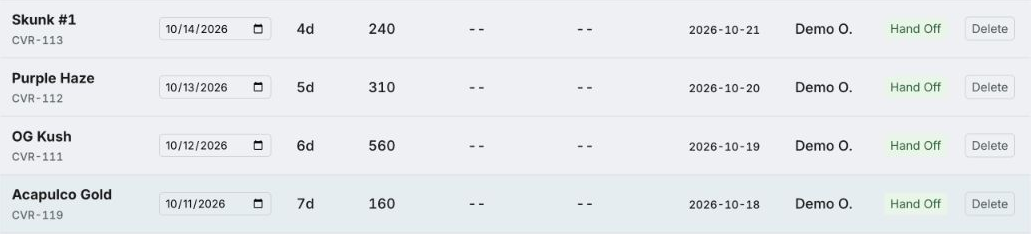
The lab has 160 Acapulco Gold shoots in the root-induction stage, labeled RIM in the app. Review its dates and condition before handing it over.

A total plant count becomes a specific batch the team can act on.

Root-induction batch list with Acapulco Gold highlighted: 160 shoots, transfer due October 18, and the Hand Off action.
Other fictional batches are shown for context. Available shoots are not the same as finished plants. Open this screen larger in a new tab

Step 3 of 5 / The handoff

Record the move to the next stage.

After the lab records the handoff, the same 160 shoots appear in Cloning. The record keeps the start dates and an expected rooting date of November 1.

The next person can see what moved and when to check it.

Acapulco Gold now in Cloning with 160 shoots sent, October 18 clone start and November 1 expected rooting date. Rooted count is not yet recorded.
Expected rooting is a forecast. The team still needs to inspect the plants and record the result. Open this screen larger in a new tab

Step 4 of 5 / The order update

Record what was sent for this order.

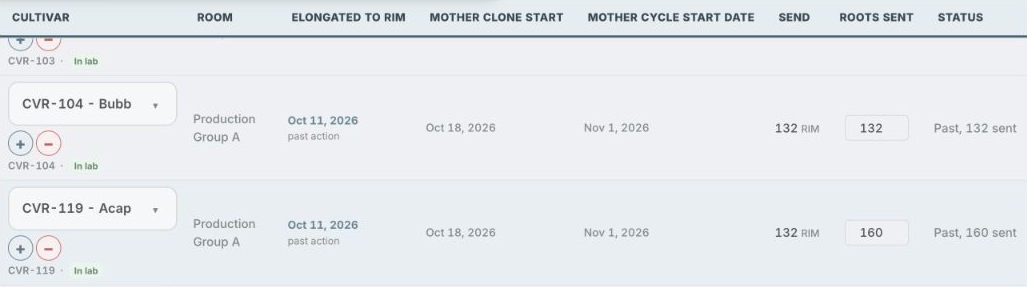
The team enters 160 in the order’s “Roots sent” field. The planner now shows 160 sent against the 132-shoot input target.

Operations can compare the plan with the quantity recorded for its order.

Acapulco Gold production order showing 132 RIM shoots planned, 160 in Roots sent and status Past, 160 sent.
This order update is a separate action from moving the batch. “Past” refers to the earlier lab-start date, not a finished production cycle. Open this screen larger in a new tab

Step 5 of 5 / The next task

Keep the next job on the calendar.

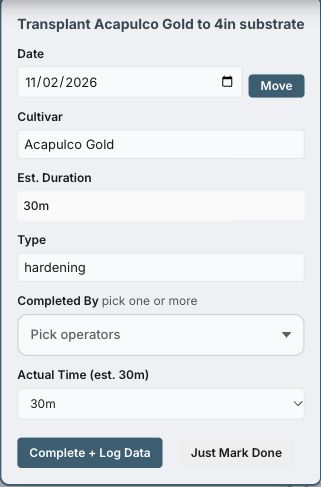
The calendar generates an Acapulco Gold transplant reminder for November 2, the next working day after the expected rooting date in this example.

The team can open the task, review it and log the work when it is done.

Task detail for Transplant Acapulco Gold to 4in substrate, dated November 2, with operator selection and Complete plus Log Data controls.
The task is still open. Dates and workday rules depend on the lab’s settings; a reminder does not mean the plants are ready. Open this screen larger in a new tab

Bring one of your upcoming plant needs to a live walkthrough. We’ll review the setup and records your team would use.

See a wider production planner view

A separate fictional example with several varieties and production rounds.

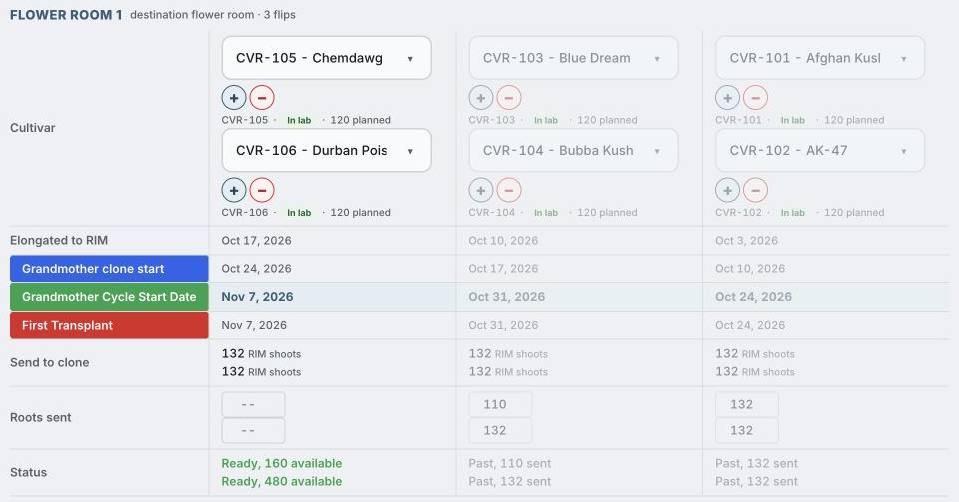
PRODUCTION PLANNER / SELECTED PRODUCT VIEWFictional demo data
Actual production planner showing six fictional cultivars across three rounds, stage dates, planned targets, recorded past handoffs and current available shoots. Full sidebar omitted.
Actual product screen with fictional records. Chemdawg is in the left column; the faded columns show earlier rounds. “RIM” is the root-induction stage before cloning. Counts and dates are examples, not customer results. Swipe or scroll to see the full detail.

02 / Give the team the next step

Know what needs
doing next.

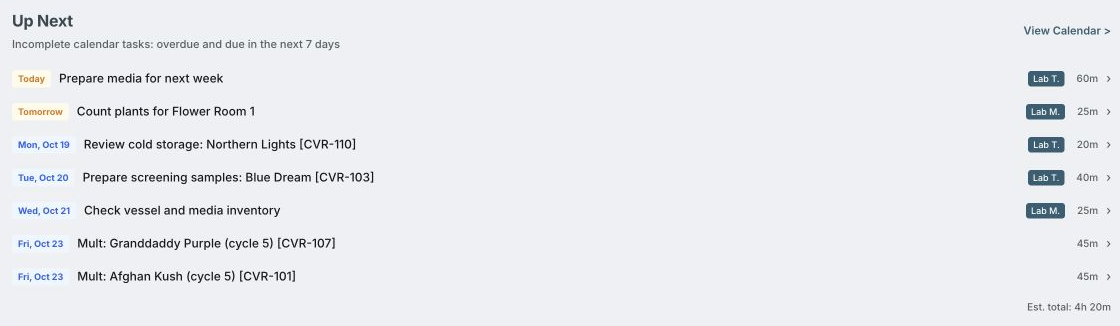
Once the plan is reviewed, the team needs a shared list of work. Check upcoming and overdue tasks, open the relevant record and log what was done. Recorded counts and handoffs give the next person an update to work from.

DAILY TASKS / SELECTED PRODUCT VIEWFictional demo data
Actual task list with upcoming media preparation, plant counts, cold-storage review, screening and inventory work. Fictional sample tasks.
A separate fictional task-list example. See what needs attention, who is assigned and the date it is due. Open a task to review it and record the work. Swipe or scroll to see the full detail.

03 / Learn what works

See which recipes
work for each variety.

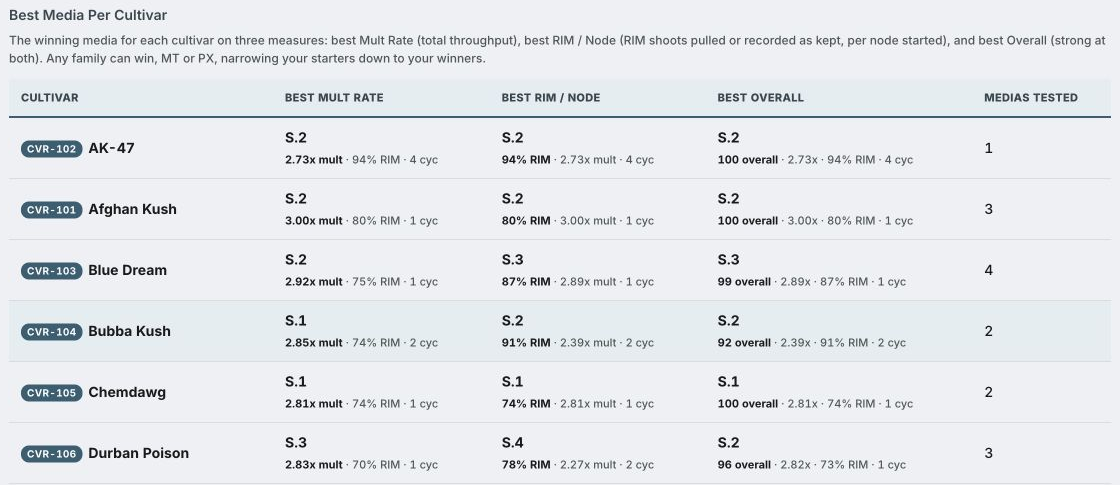
Use completed work to review the next plan. Compare the nutrient recipes, called media, tried for each variety. Check how many shoots each produced, how many were ready for rooting and how many runs support the result.

MEDIA PERFORMANCE / SELECTED PRODUCT VIEWFictional demo data
Actual media comparison showing classic cannabis varieties with one to four recipes tried and different numbers of recorded cycles. All performance figures are fictional.
Actual product screen with fictional results for familiar varieties. Compare both the outcome and the number of runs behind it before choosing what to try next. These figures do not describe actual performance of the named varieties. Swipe or scroll to see the full detail.

How much did it grow?

A multiplication rate compares shoots produced with shoots started. A 3× rate means three shoots produced for each shoot started, including those moved to rooting.

Which recipe worked?

Compare recipes for each variety. The recipe that produces the most shoots may differ from the one that produces the most shoots ready for roots.

How often was it tried?

Check the number of recorded growing cycles behind each result. One good run is a reason to look closer, not a promise.

What Clonedock tracks

More than a
multiplication rate.

The details your lab records help explain what is growing, what is working and what needs attention.

01

Multiplication

Shoots in, output and multiplication rate across recorded cycles.

02

Rootable shoots

Shoots pulled to rooting and their share of recorded output.

03

Culture populations

Counts by cultivar and stage, from initiation to hardening and preservation.

04

Media performance

Recipe comparisons by cultivar, with cycle history behind the results.

05

Lab health records

Contamination observations, pathogen screening history and culture lineage.

06

Upcoming work

Due dates, overdue actions and planned stage handoffs.

Demo figures show how the platform presents records. They are not customer outcomes, typical results or a guarantee of biological performance.

Explore the lab workflows

Tools for the whole lab

Keep the everyday
lab work organized.

Plan production, track plants, manage supplies and keep the team’s records in one place. The details below are for the people running the lab.

01

Plan production

Work backward from the plants the grow needs.

  • Room dates, production targets and stage schedules.
  • Recorded populations alongside planned demand.
  • Cultivar performance informs projections when enough usable history is available.
02

Preserve the genetics

Keep the cultivar and its history together.

  • Cultivar library with distinct nodal and meristem lines.
  • Cold-storage records and A/B rotation.
  • Revival tracking and upcoming work based on lab settings.
03

Prepare media and supplies

Connect what you make with what the lab uses.

  • Media recipes, calculations and batch records.
  • Media inventory, supply tracking and low-stock prompts.
  • Autoclave run logs and cultivar-specific media comparisons.
04

Follow lab health

Keep the observations behind each decision.

  • Pathogen screening and remediation history.
  • Contamination records linked to cultures and media batches.
  • Culture and transfer history for tracing affected material.
05

Work with growers

Give clients a view of their assigned work.

  • Client portal for cultivar requests and progress.
  • Access scoped to assigned client records.
  • Staff roles control access to lab tools and records.
06

Keep the lab documented

Make the working record available to the team.

  • Lab SOPs and attached documents.
  • Recorded activity and audit history.
  • Document access and editing depend on the lab’s permissions.
07

Prepare vessel labels

Carry the record from the screen to the bench.

  • Batch label preparation and a print queue.
  • Cultivar and media information on supported Avery sheets.
  • Check label format and printer alignment for your setup.
08

Support reporting checks

Keep the human review visible.

  • Manual Metrc worksheet with population counts and batch/tag notes.
  • Reporting reminders and dated confirmation history.
  • Your team updates Metrc separately; no API connection or automatic submission.

The SOP library holds the documents available to your lab; a standalone software subscription does not include every Collective Herb consulting protocol. Screening and remediation records support your team’s review and do not certify pathogen-free plants.

See how the lab workflows connect

Your lab’s working record

What stays connected?

What can we track for each culture?

Keep its variety, source, growing stage, transfers, media and observations together. Record counts as plants move through the lab, then review the history behind those counts.

Can the grow team see what the lab has?

Clonedock brings recorded plant populations and production targets into the same platform. Staff access depends on their role; client access is limited to assigned records. See how production planning works.

Is this software for cannabis testing labs?

Clonedock is built for labs growing and preserving plants through tissue culture. It keeps screening results and observations with plant records. It is not an analytical testing system for issuing certificates of analysis.

Does Clonedock submit reports to Metrc?

No. It includes a manual worksheet for reviewing counts, batch notes and reporting confirmations. Your team checks and updates Metrc separately. See the reporting workflow.

Clonedock™

Know what moves next.

See how it fits your operation

Tell us what you grow.
We’ll show you the tools.

Walk through the software with the plant counts, dates and everyday tasks that matter to your team.

  1. Your production needTell us which varieties you grow, how many plants you need and when.
  2. The working productSee the production planner, plant records and daily tasks.
  3. Your setupTalk through your current records, team access and getting started.